Chat, Questions, and Public Q&A: Configuring Interaction for B2B Live Events
摘要: Configure public chat, dedicated questions, identity visibility, and consultation follow-up for more useful B2B live-event interaction.
B2B live events need both open discussion and a suitable route for detailed customer questions. Viewers may hesitate to describe an existing system or project in front of everyone. Treating every interaction channel as equivalent can create a mismatch between configuration and audience expectations.
Use chat for public discussion, dedicated questions for submissions to session staff, and public Q&A for answers useful to the wider audience. POLYV’s question feature is directed to presenters, assistants, and guests by default. Configure each route according to its visibility and purpose, and test identity display and live participation separately.
01 Define visibility before choosing an interaction tool
Industry discussions may invite opinions in chat. Demonstrations may require viewers to describe their environments. Procurement conversations may require later technical assessment. These tasks call for different handling.
Decide who can see the original question, who answers it, and whether it may be quoted publicly. When submissions contain customer names, operational data, or error screenshots, the host should summarize the general question rather than read everything aloud.
Visibility also concerns staff access. Assign administration and participation roles so that questions reach the people who need to handle them.
02 Separate public conversation from question collection
POLYV documentation distinguishes dedicated questions from ordinary chat. Questions are sent to presenters, assistants, and guests instead of appearing directly as public chat by default. The menu name, welcome message, and input prompt can guide the audience toward useful submissions.
For a technical briefing, ask for the task and the step causing difficulty. Where screenshots are necessary, enable image submission in the relevant settings and ask participants to remove unrelated personal or confidential information.
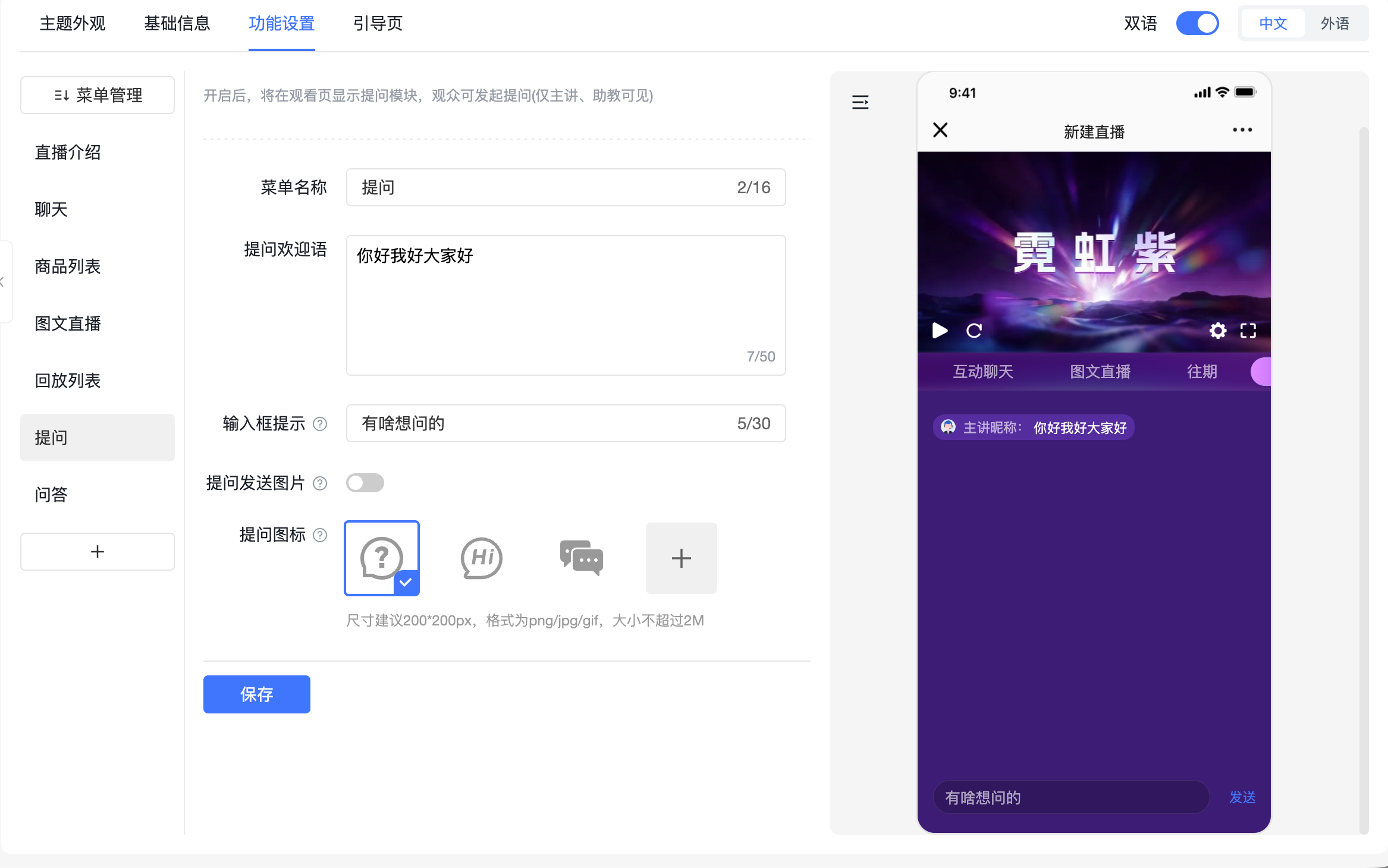
If the question entry is missing, check the viewing-page menu, saved configuration, and template applied to the current channel. Editing a template alone does not establish that the live event uses it. Test as a viewer.
03 Review questions before public answers
Public Q&A is useful for shared concerns such as prerequisites, operating conditions, and resource access. POLYV’s question documentation refers to public Q&A capabilities when submissions need broader display. Confirm the behavior in the chosen viewing interface.
An assistant can group duplicates, separate account-specific matters, and identify questions that must be clarified during the presentation. This allows the presenter to focus on the explanation.
Do not remove essential technical context merely to shorten a question. Public wording should preserve the environment and assumptions required to interpret the answer while removing information that identifies a particular customer.
04 Test question privacy and identity visibility separately
Keeping questions out of public chat does not necessarily hide viewer identities. Nicknames, participant lists, live video, and shared screenshots involve separate surfaces. Inspect each one when an event requires restricted identity visibility.
Use two viewer identities and one staff identity to check chat, questions, Q&A, member lists, and participation controls on desktop and mobile. Remove unnecessary menus where a focused viewing and consultation experience is preferable.
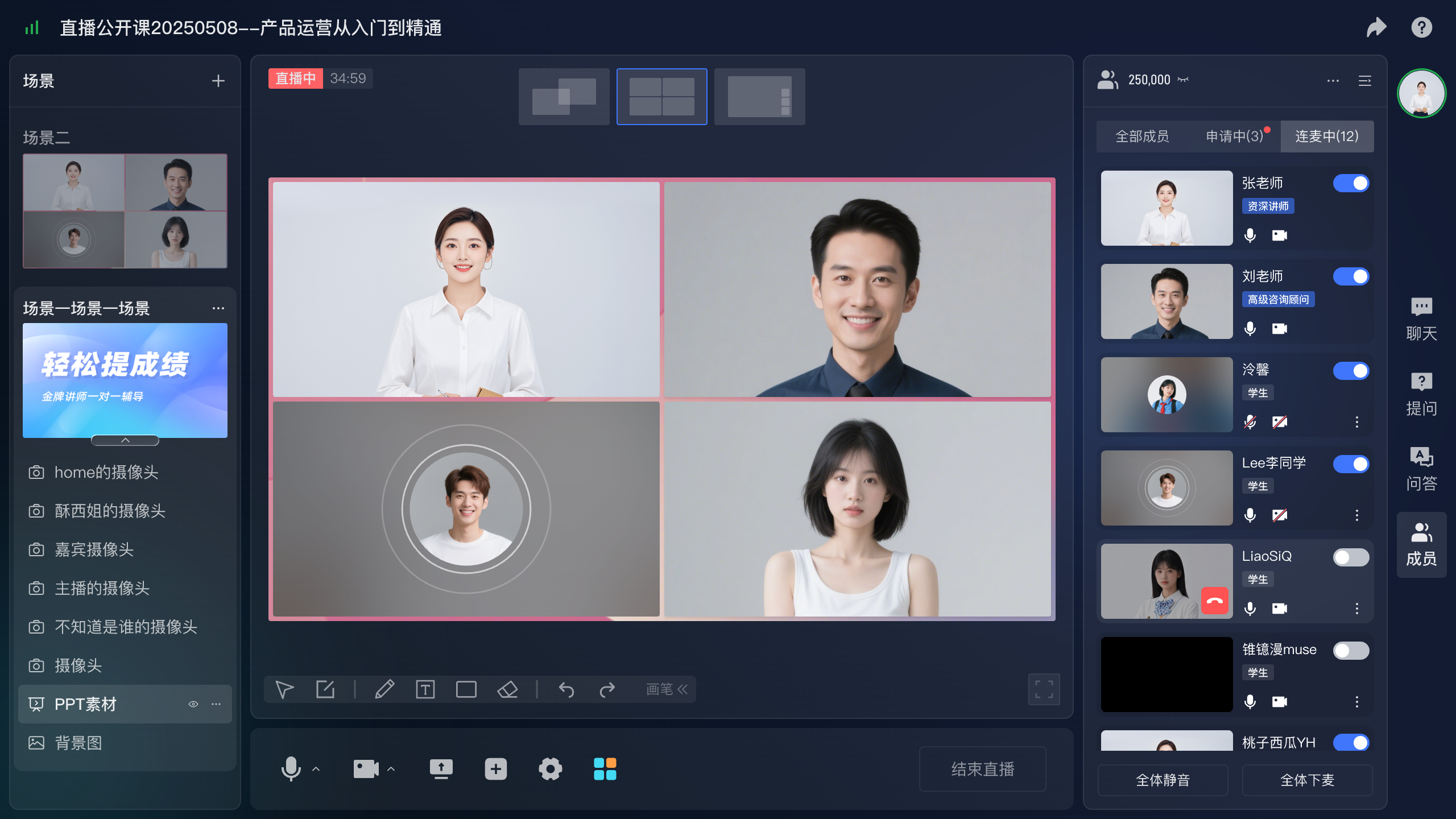
Before inviting someone to speak, explain the purpose and confirm willingness. If a customer interface will be shared, agree on a demonstration environment or appropriately prepared content first.
05 Connect receipt to resolution
A question is not finished when it is received. Maintain internal states such as answered, awaiting verification, and requiring individual discussion, with an owner and next action. This may use a work sheet or an existing service system; it is an operating procedure rather than an assumed automatic platform function.
Presenters should route unknown details for verification instead of making unconfirmed promises about versions, prices, or implementation. Retain the original question and relevant conditions so that the technical owner can review it accurately.
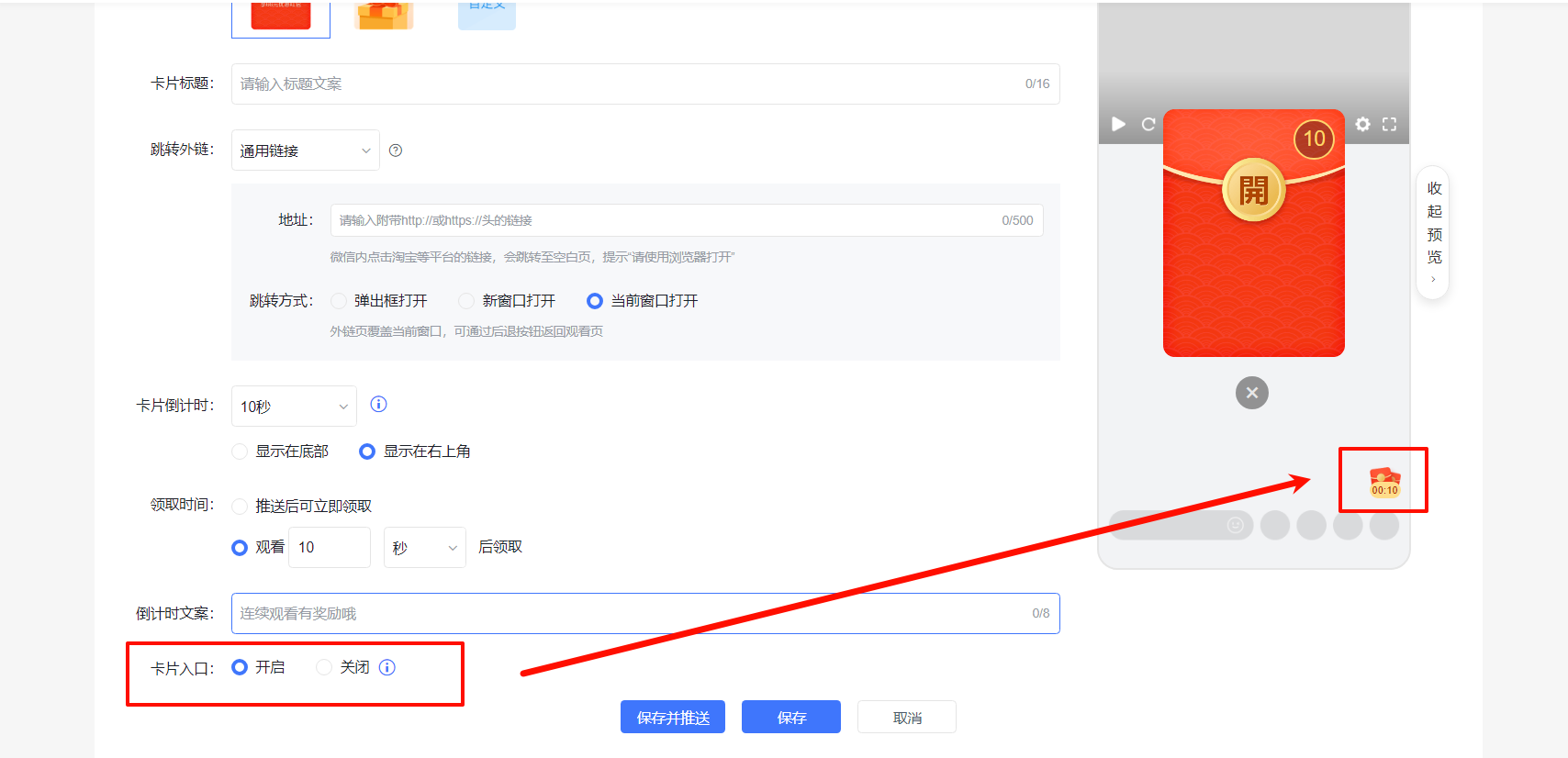
For viewers explicitly requesting further discussion, a POLYV card can link to a consultation form. Explain what information is needed and who will respond. Reconcile clicks separately from successful submissions.
06 Adapt the interaction mix to the event
A product update may emphasize presentation, questions, and consultation. An industry discussion may add chat and curated public Q&A. A targeted technical session may include controlled live participation. Choose by the audience’s task rather than by the number of available menus.
Rehearse a public question, a customer-specific question, and an issue requiring later verification. Test who decides visibility, who alerts the presenter, and who owns follow-up. Sending a message successfully is only one part of the workflow.
During busy periods, assistants can address access issues, presenters can answer questions affecting shared understanding, and complex matters can enter follow-up. Let participants know how their question will be handled to reduce repeated submissions.
Before turning answers into public content, review identifiers and applicability again. A question received during an event is not automatically ready for unrestricted promotional use.
Measure whether promised responses were completed and recurring questions improved future content. Message volume describes activity; resolution describes a more useful service outcome.
07 Frequently asked questions
7.1 Can all viewers see dedicated questions?
POLYV documents them as directed to presenters, assistants, and guests by default. Use the relevant public Q&A functionality for broader display and confirm the actual configuration.
7.2 Can all consultation happen in chat?
General public discussion can. Personal circumstances and project details are better collected through a directed route and handled individually where necessary.
7.3 Must image submission be enabled?
Only when useful. Screenshots may support troubleshooting; ordinary industry discussions may work better with text-only questions and simpler handling.
08 About POLYV
POLYV provides dedicated questions, public interaction, guest collaboration, and push cards. B2B teams can combine these with defined visibility and response responsibilities to create a continuous question-handling workflow from submission to follow-up.