A Live Streaming System for B2B Marketing Teams: Invitations, Registration, and Customer Follow-Up
摘要: Build repeatable B2B live-event operations with POLYV: event templates, invitation ownership, registration, rehearsal, customer handoff, and platform evaluation.
Once a B2B company starts running regular industry discussions, demonstrations, or partner sessions, the challenge changes from delivering one successful event to maintaining consistent delivery. Topics change, but landing pages, registration forms, speaker tests, reminders, and data handoffs recur. Rebuilding every event from scratch makes quality dependent on the person who remembers all the details.
For these teams, a connected live streaming system should support reusable operating workflows. POLYV Cloud Live covers registration, viewing, interactions, channel promotion, and reporting. WeCom capabilities can support employee invitations and customer follow-up. The company then assigns responsibility for approvals, content, and service delivery so nontechnical operators have clear steps to follow.
01 Define Event Types Before Creating Templates
Public industry briefings, product demonstrations, and targeted customer discussions have different priorities. Public briefings emphasize reach and accessible participation. Demonstrations emphasize business scenarios and application next steps. Targeted discussions place more weight on eligibility and question handling. They should not automatically inherit identical settings.
Create a configuration sheet for each type, covering audience, viewing conditions, registration fields, questions, CTAs, and handoff owners. POLYV documentation describes reusable viewing-condition settings in default templates and question configuration in live templates. Save settings that genuinely repeat, then check their suitability for every new audience.
Templates reduce repetitive setup, not editorial judgment. A new-customer event should not inherit access restrictions from a private discussion. Replace old appointment links, speaker information, and dates. A fixed checklist helps catch pages that look complete but still contain outdated information.
02 Maintain Shared Invitation Materials and Distinct Source Links
Consistent invitations do not require identical messages from everyone. Marketing maintains accurate topics, audiences, times, speaker roles, and access links. Sales explains relevance to the customer’s stated problem. Partners should use the same approved information so they do not promise different content or services.
POLYV channel promotion creates distinguishable links and QR codes. Operators can configure sources such as a company account, partner, or customer community and document where each link belongs. This records invitation sources and viewing behavior, allowing the team to examine actual participation rather than only the number of invitations distributed.
Teams using WeCom can enable personalized employee invitation materials after completing authorization and permissions. Employees invite customers from their existing communication environment, and marketing reviews the corresponding statistics. Follow-up remains with the agreed owner to reduce duplicate contact.
03 Design Registration for Both Attendees and Operators
A registration page should quickly explain who the event is for, what it will cover, and what participants can learn. The form should collect what is needed to organize the event. Moving every sales qualification question into initial registration increases effort and can make an educational session feel like premature screening.
POLYV registration supports configurable fields, required fields, privacy statements, and approval. Public briefings can collect necessary contact details and interests. Targeted demonstrations can add roles and requirements relevant to eligibility. Assign the approval owner before invitations start.
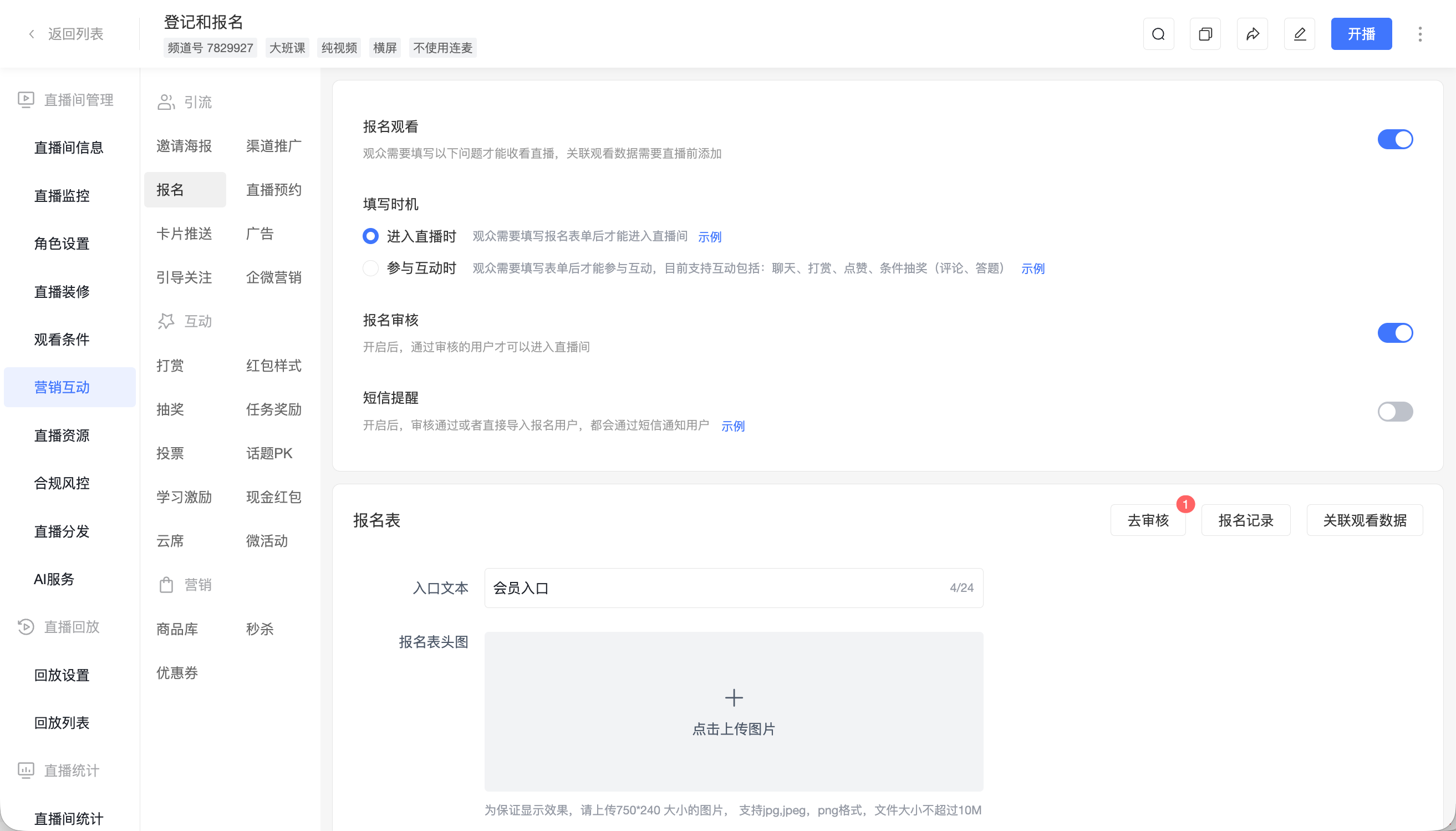
*Figure 1: Configure registration, approval, and information fields to match the event’s purpose. Source: POLYV Help Center.*
Associate supported registration fields with viewing data before going live when audience analysis is required. If external account authorization is involved, technical staff should validate identity mapping. Operators should check that the resulting records answer practical questions about registration, attendance, and interests.
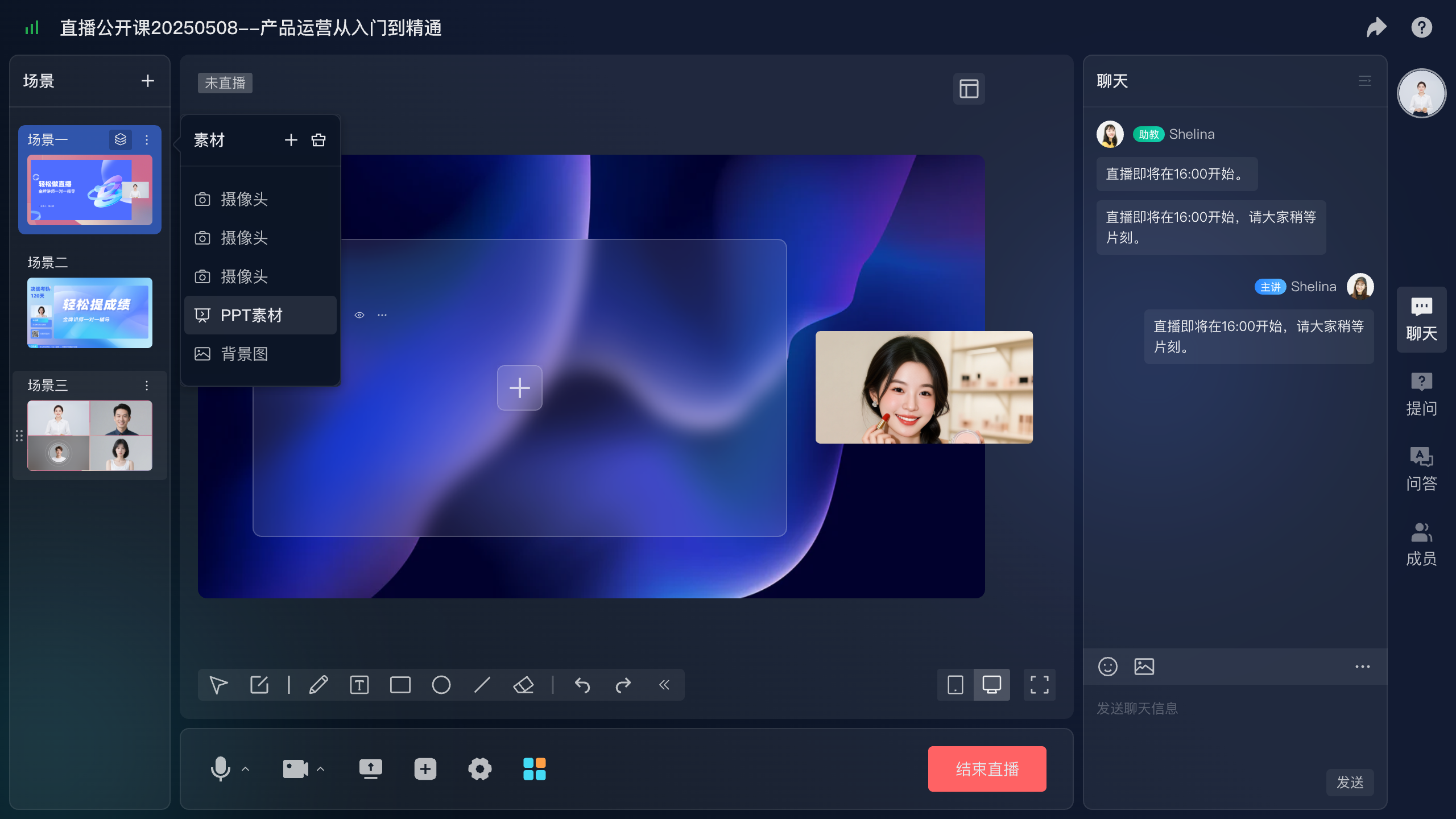
*Figure 2: Presenter-console illustration showing cameras, presentation materials, and background assets organized around an agenda.*
04 Make Nontechnical Operation Possible Through Clear Tasks
Standard configuration, content preparation, and systems integration require different responsibilities. Marketing operations can manage registration settings, event information, invitation materials, and action links. Hosts and presenters own content and pacing. An assistant handles questions and coordination. Technical staff implement account authorization, data synchronization, and complex customization.
A small team can combine roles, but the presenter should not have to operate every control while speaking. Someone should monitor audience access, unanswered questions, and CTA timing and assist the presenter when needed.
| Stage | Required work | Acceptance result |
|---|---|---|
| Before promotion | Confirm content, viewing conditions, forms, and links | An external test viewer can register |
| Before broadcast | Test speaker sharing, questions, and cards | Presentation, interaction, and links work |
| During the session | Manage pacing, questions, and relevant CTAs | Audience requests have an owner |
| After the session | Check records, process requests, and organize replay | Follow-up needs are assigned |
Rehearse with the same roles and devices planned for the live event. Speakers test sharing on their actual computers, operators test real destination pages, and viewers test entry on phones and computers. A full workflow rehearsal reveals more organizational problems than an audio check alone.
Prepare an exception-handling sheet for a disconnected speaker, inaccessible viewing page, or broken destination link. Assign responders and a way to inform affected participants. Record incidents and their resolution so subsequent rehearsals can revisit previously weak steps.
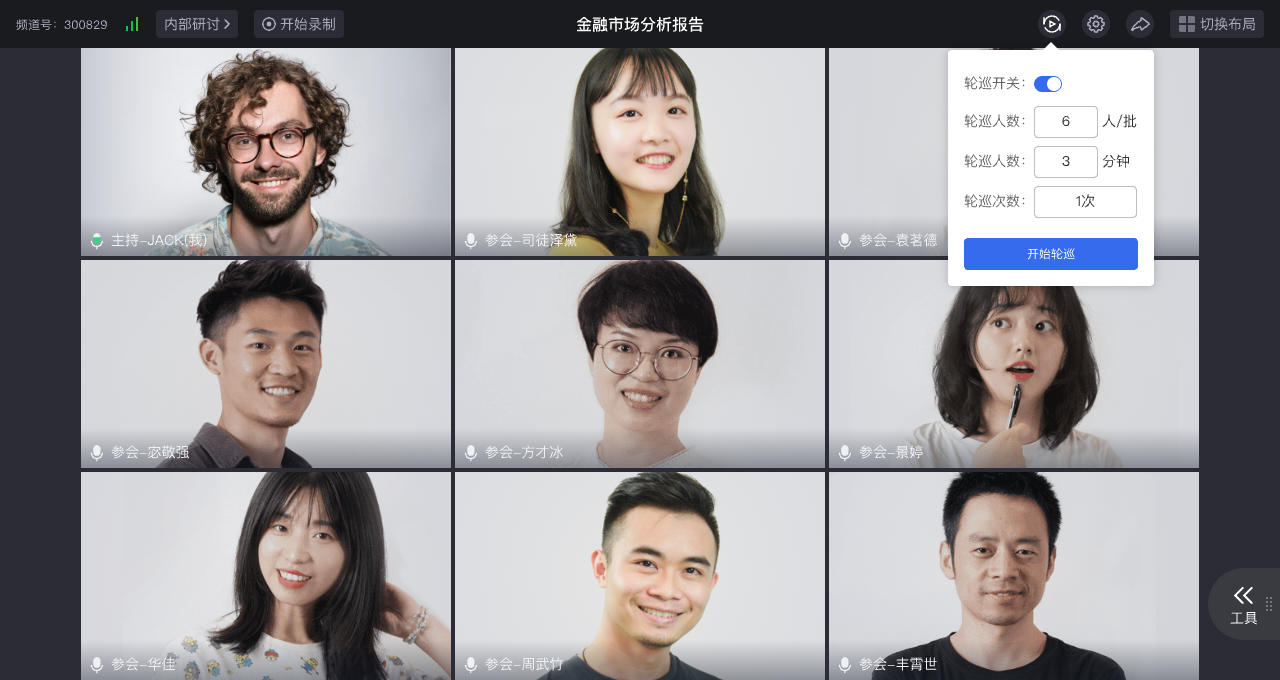
*Figure 3: Seminar rotation configuration illustration. Multi-person rehearsals should check both layouts and host controls; the values shown are not universal setup requirements.*
05 Define a Handoff Standard Beyond a Contact List
Information delivered to the next owner should include the event topic, participation status, explicit questions, and submitted requests. POLYV provides viewing and interaction data, regular cards provide click records, and WeCom capabilities can help employees review participation and move into customer communication.
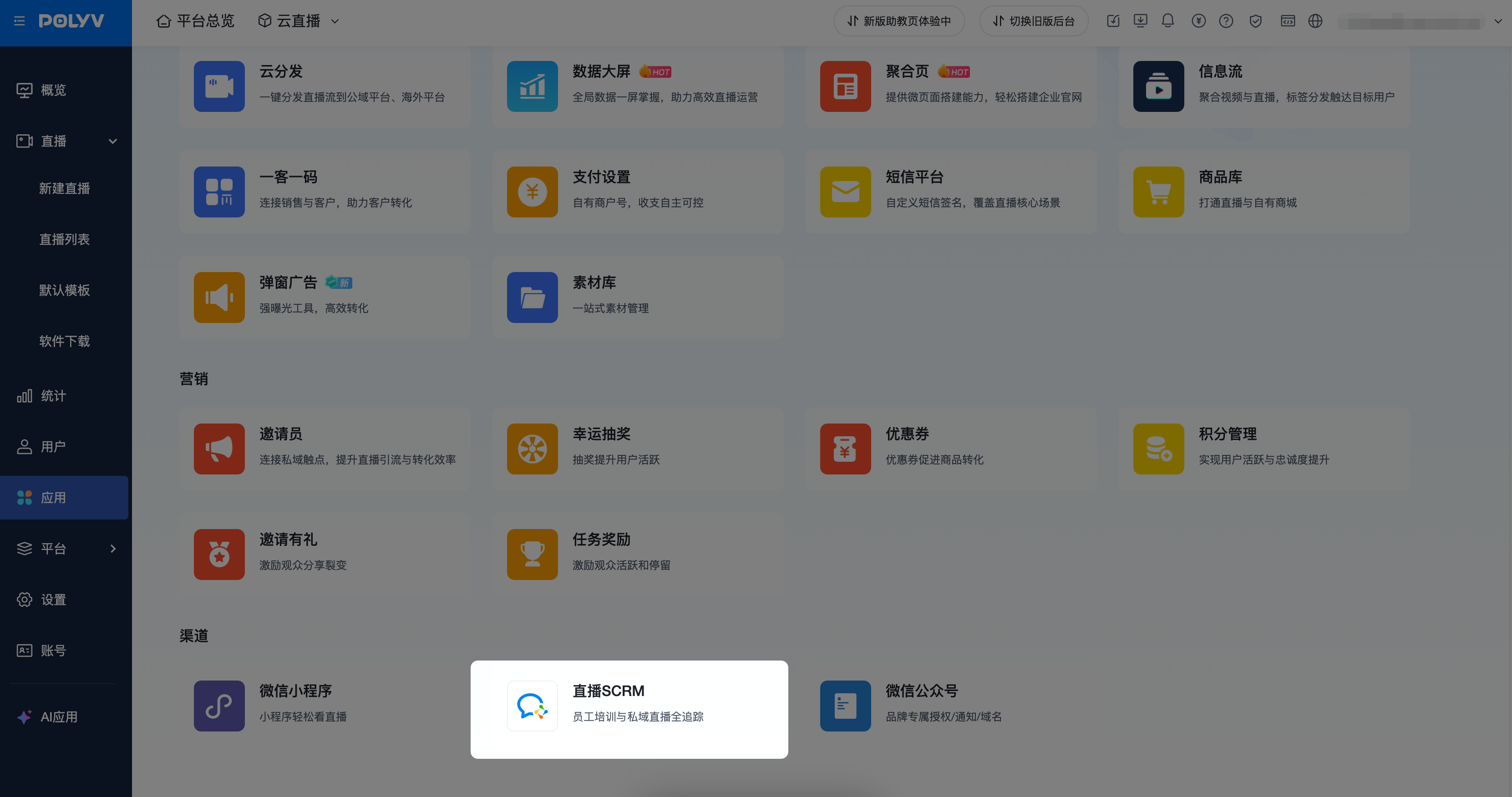
*Figure 4: WeCom integration provides an entry point for employee invitations and follow-up, subject to the required enablement and authorization. Source: POLYV Help Center.*
Marketing and sales should agree on response procedures: confirm explicit consultation requests, assign specific questions to suitable specialists, and continue relevant content delivery for people still exploring the topic. Set timelines according to actual service capacity and assign resources before the event.
Existing customers and new contacts may need different ownership rules. Preserve established relationships for the former and allocate the latter according to business scope and resources. A workable follow-up record needs an owner, current status, and next action. More fields alone do not create accountability.
06 Evaluate Total Operating Work, Not Feature Counts
Use a real event in platform evaluation and complete the process from channel setup through request handoff. Record which tasks an operator can perform independently, which need technical support, and which require additional enablement. This is a better basis for long-term suitability than a feature checklist alone.
Confirm the actual procurement scope. Live viewing usage, recordings, VOD storage, SMS, WeCom-related licensing, integration, and event services may be separate components. Document frequency, audience scale, staff roles, and integration needs before comparing proposals and organizational cost.
Afterward, review business outcomes and operating issues separately. Did the event attract a relevant audience and generate useful discussions? Did repeated setup, missed requests, permission errors, or version confusion occur? Turn recurring operating issues into template settings and checklist items.
07 Frequently Asked Questions
7.1 Can a team without dedicated developers start livestreaming?
Start with standard pages and console configuration for registration, viewing, interactions, and manual handoff. Arrange technical support when existing identity systems, automated synchronization, or custom workflows are needed.
7.2 Does a connected system automate every task?
The platform consolidates event capabilities. Content planning, eligibility decisions, adviser assignment, and customer service remain team responsibilities. Document configuration and ownership together.
7.3 How can teams reduce operational pressure with remote speakers?
Test speaker access, document or desktop sharing, speaking order, and host coordination. Evaluate POLYV’s seminar product for deeper multi-person discussion and rehearse the selected format.
08 About POLYV
POLYV provides Cloud Live, seminars, marketing interactions, reporting, and integration services for recurring B2B events. Teams moving from occasional sessions to a program can begin with one event type, validate its template and responsibilities, and then expand.