A B2B Webinar Platform Recommendation: One Connected Workflow from Registration to Consultation Booking
摘要: Connect webinar registration, attendance, questions, and consultation requests. This POLYV workflow explains identity, calls to action, booking handoff, and measurement.
A B2B webinar usually has three jobs: attract people who care about a business problem, help them understand a possible solution, and give interested participants a practical way to arrange a consultation. Registration is only the beginning. Confusing access links, disconnected Q&A, or a booking button that leads to a generic homepage can interrupt that progression.
A suitable webinar platform connects registration forms, viewer identity, live interaction, and consultation entry points. POLYV Cloud Live supports registration, viewing, and card-based calls to action. When several speakers need to share materials and discuss a topic remotely, teams can also evaluate POLYV’s seminar product. Consultation forms, adviser availability, and booking confirmation remain part of the company’s business workflow.
01 Define the Consultation Before Designing the Registration Form
Start with the action that makes sense after the session. An industry briefing might lead to a research download. A solution presentation might lead to a needs discussion. A product demonstration might lead to a tailored demo. Each action requires different information; a generic “Contact us” message obscures those differences.
For example, a process digitization webinar for operations managers could offer a follow-up discussion about one workflow the participant wants to improve. The registration page should explain the intended audience, questions covered, speaker responsibilities, and schedule. This helps visitors judge relevance and gives the organizer a basis for preparing the session.
POLYV registration supports configurable fields, required information, privacy statements, and registration approval. A company can collect names, contact information, company details, roles, and questions using the appropriate text, question, or selection fields. Keep initial registration focused on organizing the event; discuss budgets and procurement schedules after someone requests a consultation.
Approval is useful for targeted industry discussions or detailed sessions. Define the eligibility criteria and assign an owner before opening registration. Public educational sessions can use a lighter entry process to avoid unnecessary waiting.
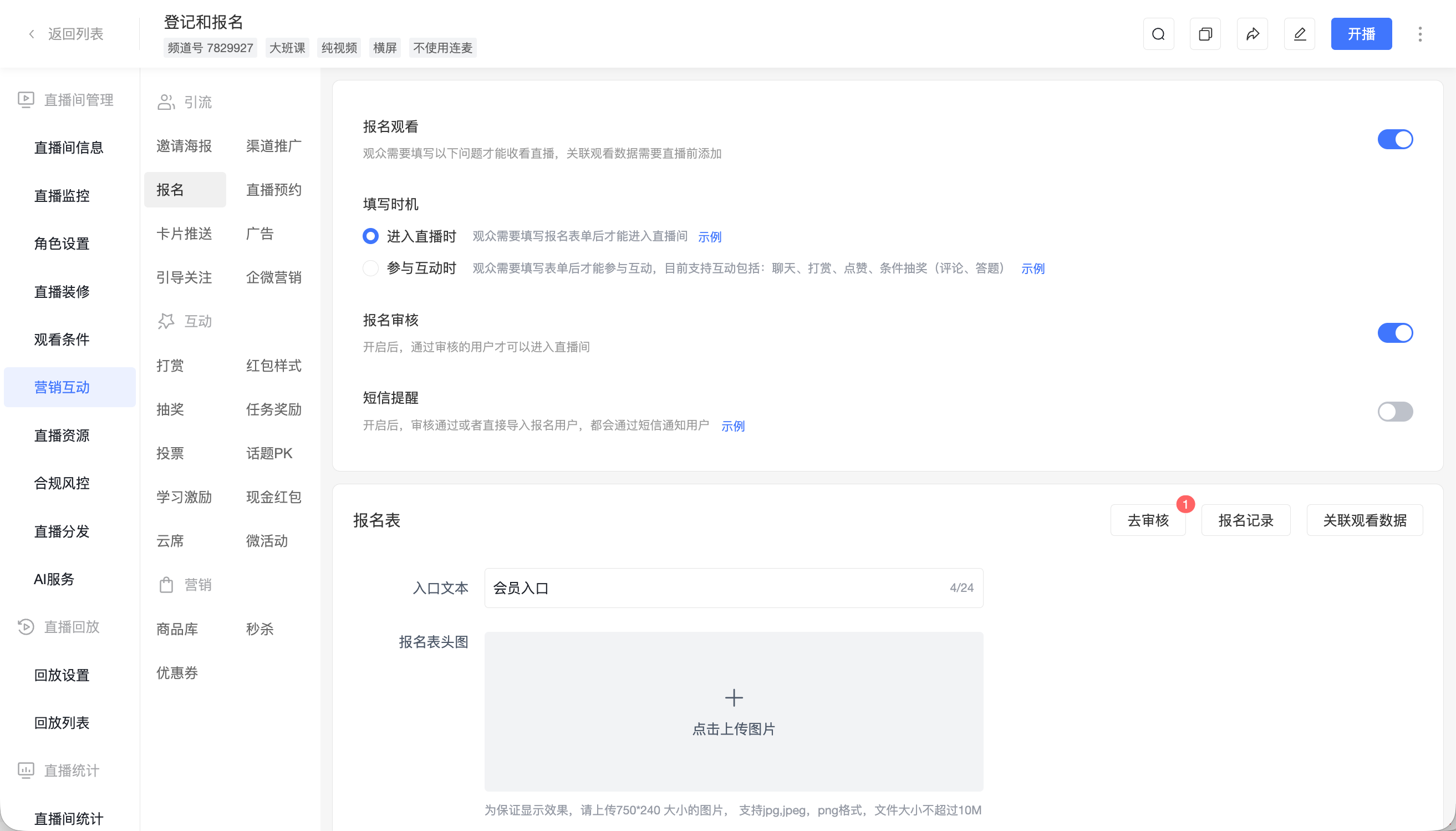
*Figure 1: Registration settings support configurable fields, approval, and the timing of information collection. Source: POLYV Help Center.*
02 Connect Registration and Attendance to a Consistent Identity
A participant may register on a phone, watch on a computer, and later open a replay from an email. The organizer needs to understand that person’s journey rather than treat every visit as a new prospect.
POLYV’s registration documentation describes a setting that associates supported registration fields with viewing and interaction data. Configure this before the live session and include it in the launch checklist. Otherwise, the team may face additional manual work matching registration records with viewing reports afterward.
Identity design should reflect the actual participation process. Choose a primary route—such as mobile-number registration or authorization through an existing customer account—and test its interaction with registration settings. Companies with an established account system can evaluate POLYV’s integration capabilities. For a first event, the standard registration and viewing flow is easier to organize and validate.
Invitations should state the time, topic, viewing link, and participation instructions. Teams can distribute them through existing email, community, or sales channels and configure applicable registration SMS notifications. Each message should make the next step obvious.
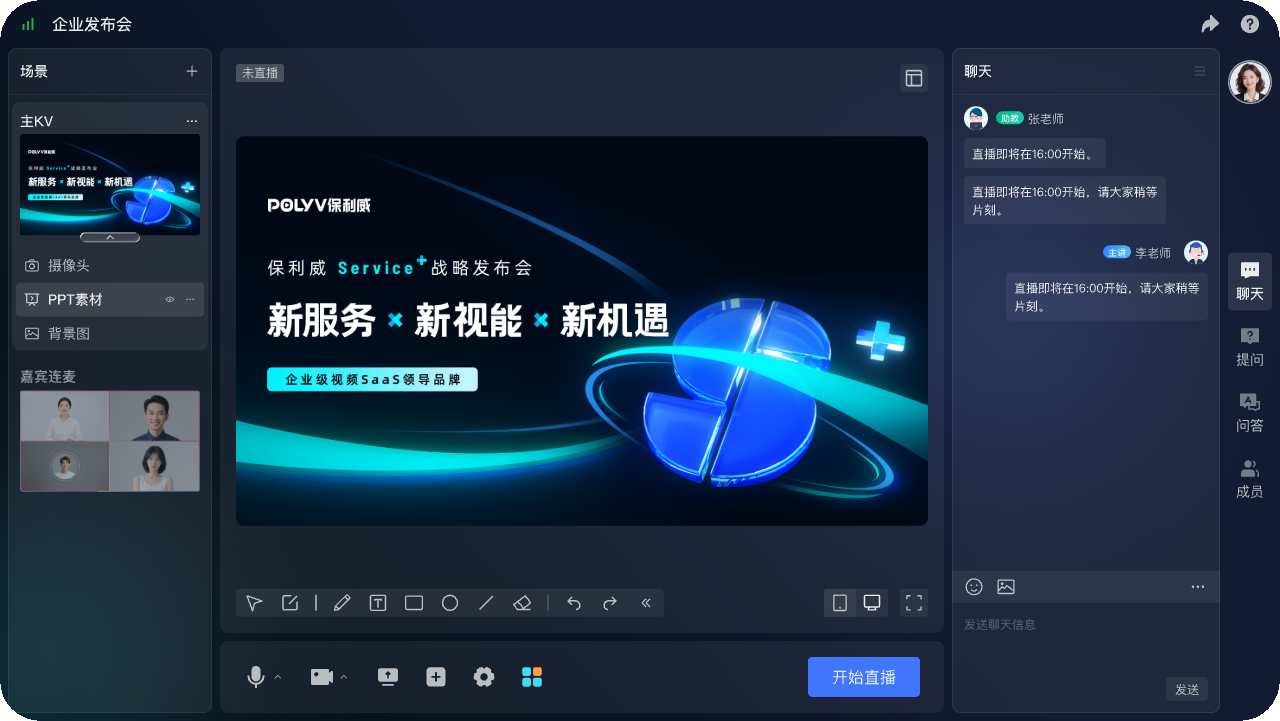
*Figure 2: Presenter-console illustration showing presentation materials, guest connections, and interaction controls in one workspace.*
03 Structure the Discussion to Elicit Useful Questions
A webinar earns its value by explaining a business problem. A clear agenda moves from the current situation to possible approaches, implementation conditions, and focused Q&A. In a panel discussion, assign speakers complementary roles instead of having each repeat the same background.
POLYV’s seminar product provides document and desktop sharing and multi-person audio/video interaction for remote discussion. Presentation-led customer events can instead start from Cloud Live’s viewing and interaction configuration. Evaluate host controls, speaker access, audience entry, and question handling together—not only whether video plays.
Questions collected during registration can shape the agenda. Questions submitted during the session reveal what still needs explanation. An operator can combine duplicates and sequence responses. Requests involving a company’s architecture, pricing, or sensitive data can move to a private follow-up discussion.
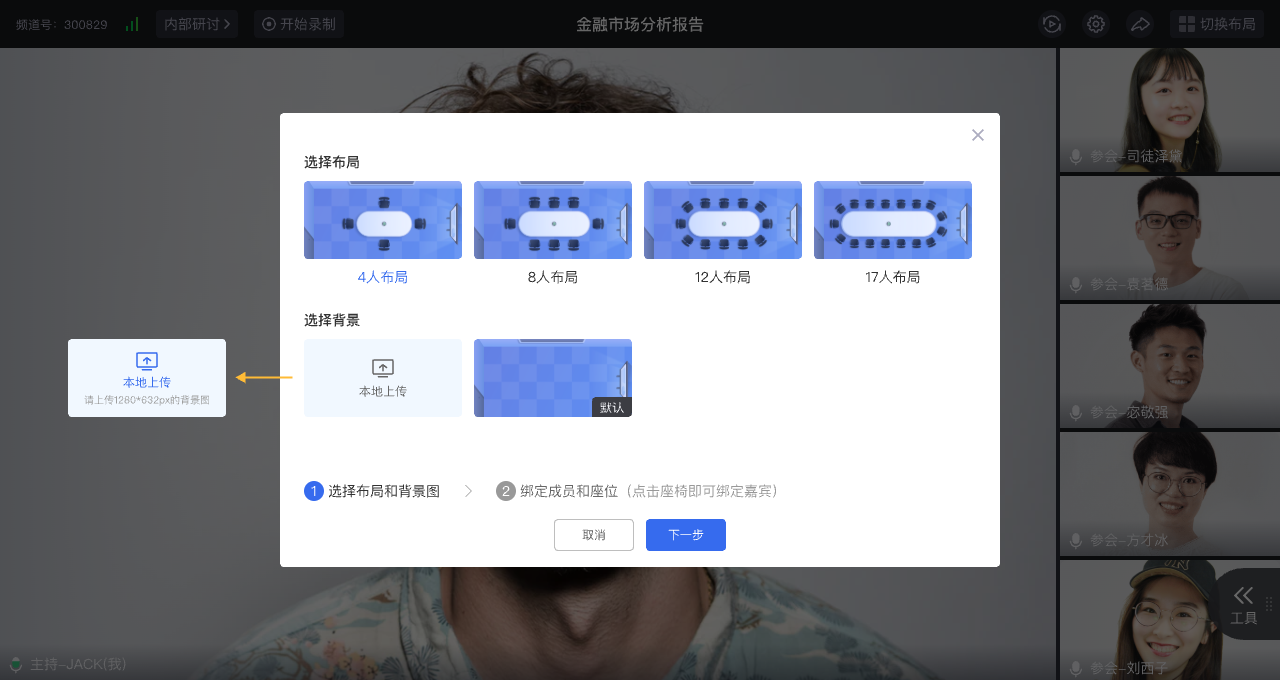
*Figure 3: A seminar layout and background configuration example. The participant options shown belong to this illustrated interface and are not a universal capacity statement.*
04 Present a CTA When the Audience Can Evaluate Its Value
A call to action should offer a specific, achievable next step after the relevant explanation. Repeatedly displaying the same button is less useful than matching the action to the audience’s current question.
POLYV card push supports regular link cards and QR-code cards. An operator can introduce a white-paper request after an industry discussion and a consultation form after a solution demonstration. Regular cards provide click records that can be viewed and exported. QR-code cards can support actions such as connecting through WeCom.
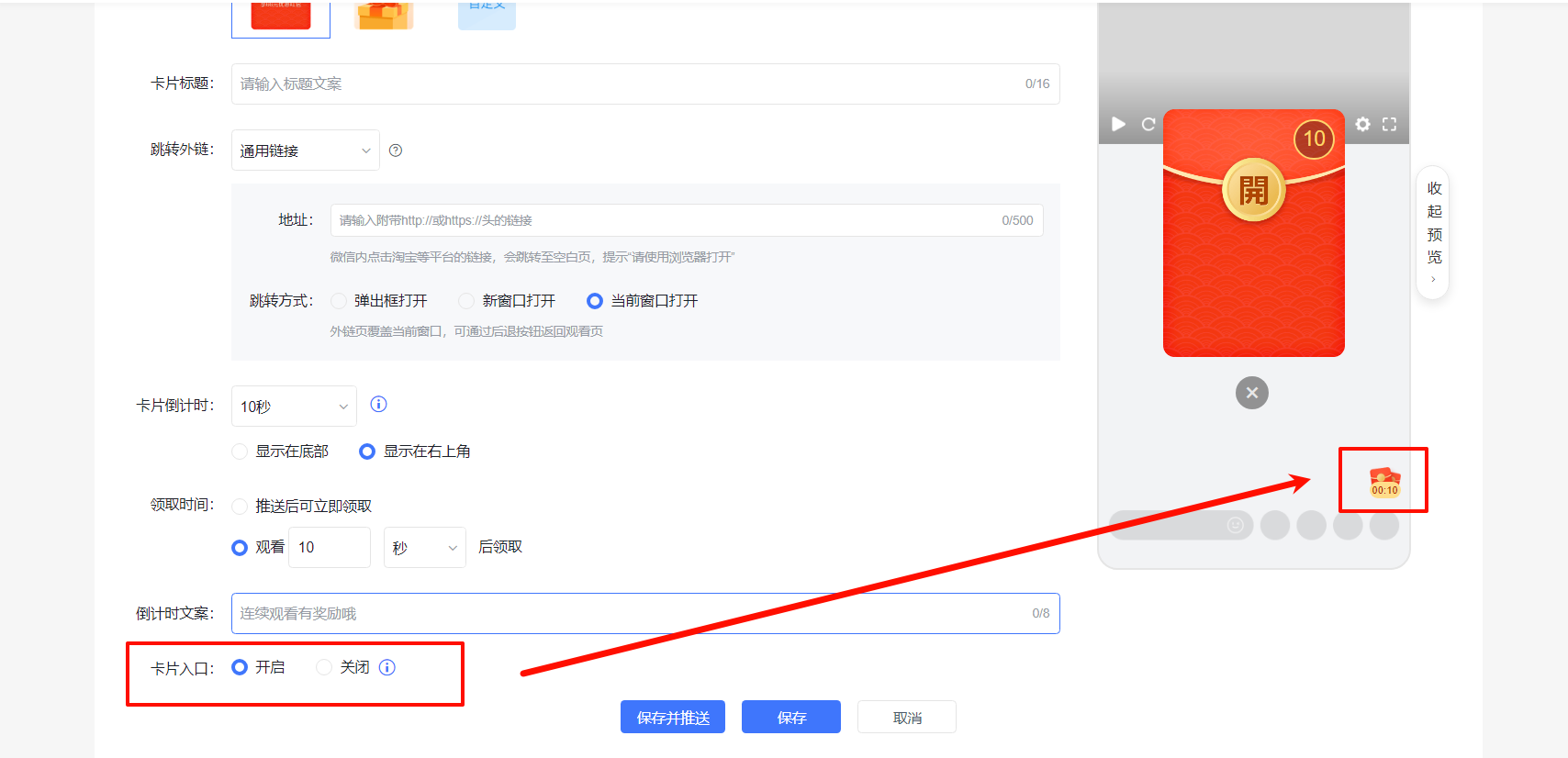
*Figure 4: Card configuration connects the session with a resource request or consultation entry point. Source: POLYV Help Center.*
The destination page should continue the promise made by the button. “Book a workflow assessment” should lead to a page explaining the scope, intended audience, preparation, and contact arrangements. It can collect the problem to discuss and preferred contact times, with a responsible person confirming the appointment. Live adviser availability and automatic calendar bookings should be handled by a scheduling system that provides those functions.
A card click, form submission, confirmed appointment, and completed consultation are separate states. POLYV click records show use of the entry point; the external form or booking system records completion. Agreed event and customer identifiers can connect those records.
Test mobile form completion, success messages, and the route back to the viewing page. Provide a clear retry path after a failed submission, and avoid asking someone who already submitted to fill in the same information again.
05 Diagnose Results One Stage at a Time
Review results in business order: valid registrations, actual attendees, action submissions, confirmed appointments, and completed consultations. Fix the deduplication method, reporting window, and denominator for each metric. Do not mix visits with individual customers.
| Stage | Question to investigate | Evidence |
|---|---|---|
| Registration to attendance | Were the topic, timing, and reminders appropriate? | Registration and viewing records |
| Attendance to click | Did the content create interest in further discussion? | Viewing data and regular-card clicks |
| Click to submission | Was the destination clear and the form proportionate? | Company form or business system |
| Submission to consultation | Was someone responsible for confirmation and service? | Consultation outcome records |
Strong attendance with few submissions calls for checking topic alignment, page access, and form burden. Many submissions but few completed consultations suggest a confirmation or scheduling problem. This identifies a specific intervention instead of labeling the entire event ineffective.
Send edited replays and chapter guidance to registrants who missed the session. Give people who asked specific questions a relevant answer or an agreed follow-up. Continue the interest they expressed rather than repeating the same invitation to everyone.
06 Frequently Asked Questions
6.1 Must every attendee turn on a camera?
No. A presentation-led event can have speakers presenting while the audience watches and submits questions. Add audio/video participation when the discussion requires it, and select the live or seminar format accordingly.
6.2 Does registration approval indicate purchase intent?
Approval usually confirms eligibility or completeness of information. Assess commercial interest through business questions, explicit requests, and subsequent discussion.
6.3 Does consultation booking require new development?
Companies with an existing form or booking page can start with a card link. Unified login, automatic scheduling, and cross-system status synchronization require a defined integration scope.
07 About POLYV
POLYV provides enterprise live streaming, seminars, video on demand, and integration capabilities for registration, live interaction, and replay access. For B2B webinar acquisition, validate registration, attendance, booking, and confirmation with one focused event before expanding into a series.